After successfully setting up my self-hosted n8n environment, the next step was to build my first automation. Rather than focusing on a complex workflow, the goal of this project was to understand the fundamentals of how n8n works by creating, configuring, and executing a complete workflow from start to finish.
This project documents the development process, the decisions made during implementation, and the lessons learned while becoming familiar with n8n’s workflow builder, nodes, and automation logic.
Table of Contents
- Overview
- Objectives
- Research
- Planning
- Implementation
- Tools Used
- Challenges
- Solutions
- Results
- Key Learnings
- Next Steps
- Resources
- Why This Project Matters
| Type | Portefolio Project |
| Status | Completed |
| Duration | A couple of hours |
| Skills | n8n, Workflow Automation, API Integration, OAuth Authentication |
| Tools | n8n, Google Sheets, Google Cloud, WordPress, RSS Feed |
| Last Updated | July 2026 |
Overview
This project focuses on creating my first working automation in n8n. It covers the process of designing a workflow, connecting the required nodes, testing the automation, and verifying that it performs the intended task successfully. The project also provides a foundation for building more advanced automations involving APIs, AI services, marketing platforms, and business applications in future projects.
Objectives
- Build my first complete workflow using n8n.
- Understand how nodes are connected to create an automated process.
- Learn how to configure and execute a workflow successfully.
- Test and verify that the automation performs as intended.
- Gain practical experience with the n8n workflow editor and core functionality.
- Establish a foundation for building more advanced automations involving APIs, AI, and marketing tools in future projects.
Research
Before building my first workflow, I reviewed the official n8n documentation to understand the fundamental concepts behind the platform. Rather than immediately creating a workflow through trial and error, I wanted to gain a basic understanding of how workflows are structured and how different nodes interact with one another.
My research focused on the following topics:
- Workflows – Understanding how workflows are created, executed, and managed within n8n.
- Nodes – Learning the purpose of trigger nodes and action nodes, and how they are connected to automate tasks.
- Node Configuration – Understanding how individual nodes are configured using parameters and credentials.
- Workflow Execution – Learning how to manually execute workflows, inspect execution data, and identify errors during testing.
- Official Documentation – Using the n8n documentation as the primary reference throughout the implementation process.
The research provided a solid foundation for building my first automation and helped me understand the basic workflow concepts before moving on to more advanced automations involving APIs, AI services, and external applications.
Planning
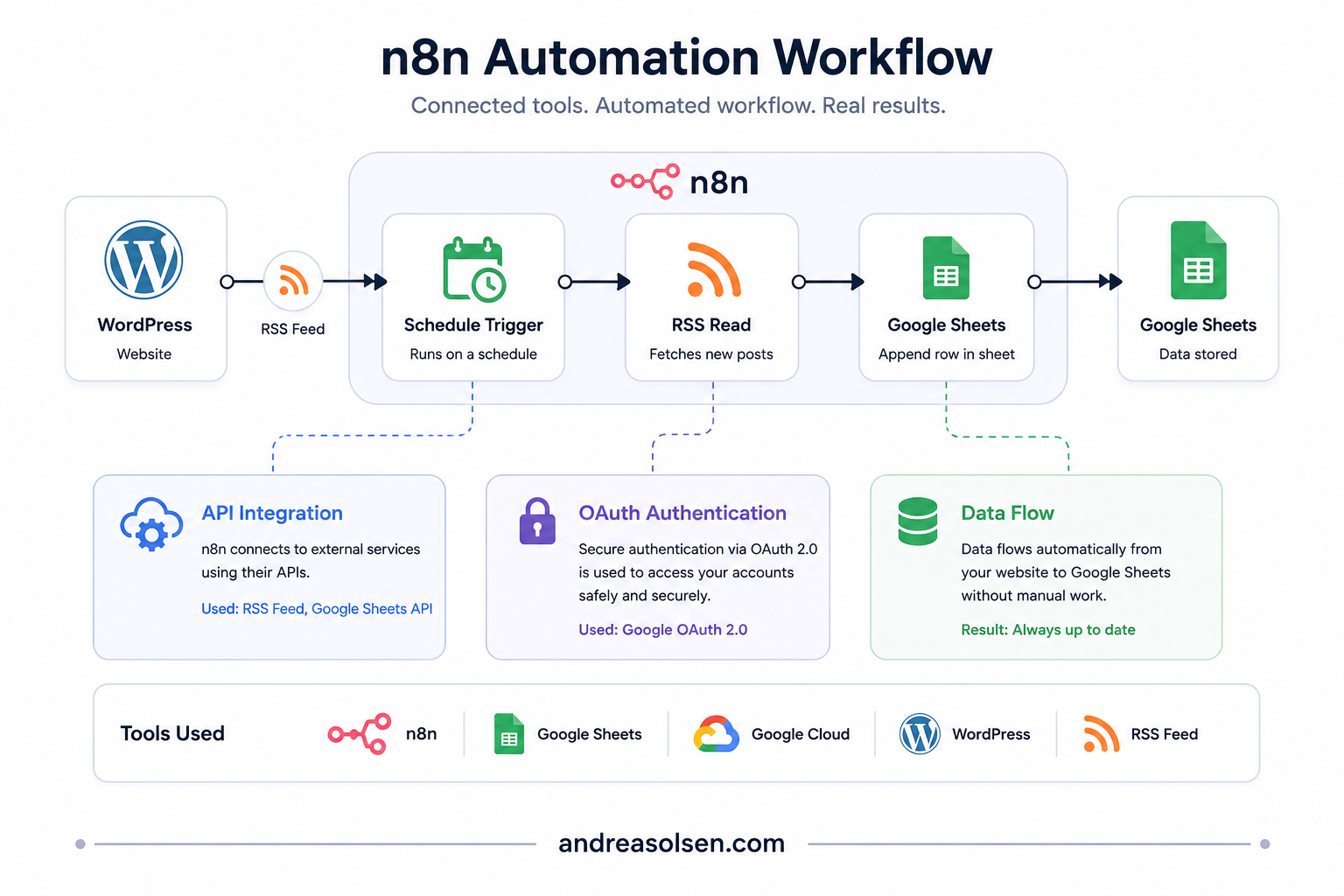
Before starting the implementation, I decided to build a workflow that automatically retrieves articles from an RSS feed and stores the relevant information in Google Sheets. This use case was selected because it combines two external services while remaining simple enough for a first automation project.
The planned workflow consisted of the following components:
- Trigger: RSS Feed Read
- Action: Retrieve new feed items.
- Output: Store the article title, publication date, and URL in Google Sheets
This approach provides a solid foundation for building more advanced automations involving APIs, AI services, databases, and external applications.
Implementation
The workflow was built to automatically collect information from an RSS feed and store it in a Google Sheets spreadsheet. This provided a practical introduction to connecting external services and working with data in n8n.
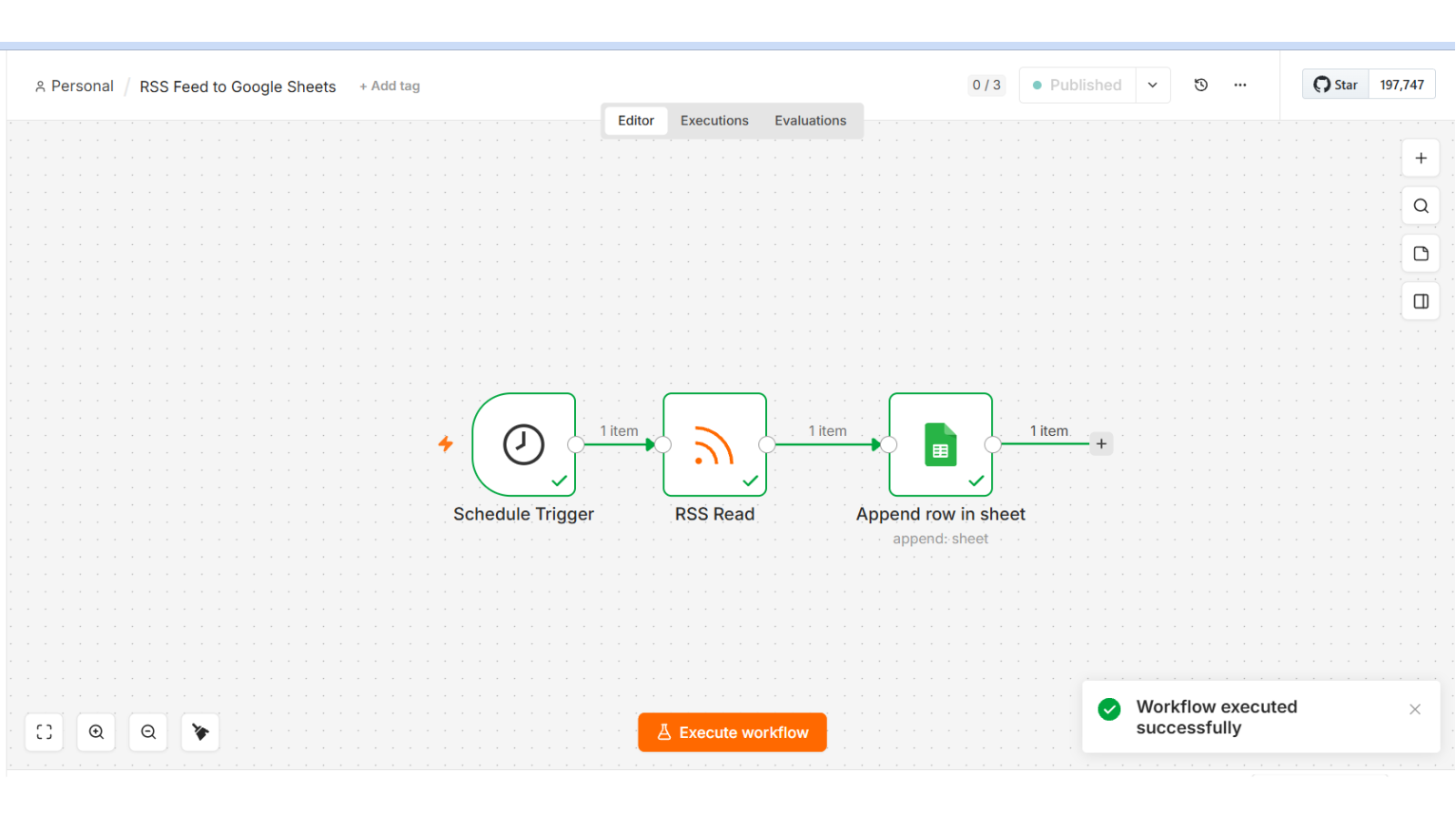
- Replaced the manual trigger with a Schedule Trigger configured to run once per day.
- Configured the RSS Read node to retrieve articles from my WordPress RSS feed.
- Added a Google Sheets node using the Append Row operation.
- Created a Google Cloud project and configured OAuth authentication for Google Sheets.
- Enabled the required Google Sheets API and Google Drive API.
- Connected the workflow to a Google Sheets document.
- Mapped RSS fields, including title, link, publication date and author, to spreadsheet columns.
- Tested the workflow to verify that new articles were successfully added to Google Sheets.
Tools Used
- n8n
- Google Sheets
- Google Cloud
- WordPress
- RSS Feed
Challenges
- Learning n8n’s workflow logic
- Understanding how nodes connect, how data moves between them, and how execution flows through a workflow required a different way of thinking than traditional programming.
- Understanding data mapping
- Passing data correctly between nodes and referencing values from previous steps was initially challenging.
Google API Authentication
- Created OAuth credentials in Google Cloud for a self-hosted n8n instance.
- Configured the OAuth consent screen and added my Google account as a test user.
- Learned that the Google Sheets node also requires the Google Drive API to access available spreadsheets.
- Resolved a 403 Forbidden error by enabling the missing Google Drive API.
Self-Hosted Environment
- Configured OAuth using a localhost redirect URI for local development.
- Learned that self-hosting requires more manual configuration than the cloud version.
- Gained practical experience with authentication, API configuration and infrastructure setup.
Solutions
The workflow was successfully implemented and tested. The automation retrieved data from the RSS feed and stored it in Google Sheets as planned.
Results
The workflow was successfully implemented and tested. New articles published on my WordPress website are automatically retrieved from the RSS feed and appended to a Google Sheets document on a scheduled basis.
Key Learnings
- Built my first end-to-end automation in n8n.
- Gained practical experience with Google APIs and OAuth authentication.
- Learned how to integrate multiple services into a single workflow.
- Developed a better understanding of workflow design, testing and troubleshooting.
Next Steps
The next step is to build more advanced n8n workflows involving APIs, AI services and multi-step automations. The goal is to expand my practical experience with workflow design, data integration and business process automation.
Resources
Why This Project Matters
This project marked the beginning of my automation journey. Building my first working workflow gave me a practical understanding of how different systems can be connected, and seeing the automation run successfully made me eager to explore more advanced workflows and business automation.