Automation is becoming an increasingly important part of digital marketing, helping businesses save time, reduce manual work, and build more scalable processes. To develop practical skills in workflow automation, I chose to build my own self-hosted n8n environment.
This project documents the complete setup process, from installation and configuration to creating a stable foundation for future automation projects. Rather than relying on a hosted solution, I wanted to understand how n8n works behind the scenes and gain experience managing the platform myself.
The goal was not only to get n8n running, but also to create an environment that can support future integrations with marketing tools, AI services, APIs, and business systems.
Table of Contents
- Overview
- Objectives
- Research
- Planning
- Implementation
- Tools Used
- Challenges
- Solutions
- Results
- Key Learnings
- Next Steps
- Resources
- Why This Project Matters
| Type | Portfolio Project |
| Status | Completed |
| Duration | A couple of hours |
| Skills | Self-Hosting, Infrastructure Setup, Deployment, Containerisation |
| Tools | Docker, n8n, WSL, PowerShell |
| Last Updated | July 2026 |
Overview
This project focuses on installing and configuring a self-hosted n8n instance as the foundation for future workflow automation projects. The implementation includes setting up Docker, configuring persistent storage and basic application settings.
By building the infrastructure first, future projects can focus entirely on designing and automating workflows instead of platform configuration. This setup serves as the technical foundation for upcoming projects involving AI, marketing automation, APIs, CRM systems, and data integrations.
Objectives
The primary objective of this project was to build a reliable and scalable n8n environment that could serve as the foundation for future automation projects.
The specific objectives were to:
- Install and configure a self-hosted n8n instance using Docker.
- Create a secure and persistent environment for workflow development.
- Develop a basic understanding of the architecture behind n8n and its deployment.
- Prepare the platform for future integrations with APIs, AI services, databases, and marketing tools.
- Establish a reusable automation environment that can support increasingly complex workflows.
- Gain hands-on experience with the technical setup rather than relying on a managed cloud solution.
Research
Before installing n8n, I spent time researching the available deployment options and the technical concepts required to build a reliable automation platform. Rather than simply following an installation guide, I wanted to understand the decisions behind the setup and how they would affect future scalability, maintenance, and security.
One of the first decisions was whether to use n8n Cloud or a self-hosted installation. While the cloud version offers a faster and simpler setup, I chose the self-hosted approach because it provides greater flexibility, full control over the environment, and valuable hands-on experience with deploying and managing the platform. My plan is to explore n8n Cloud in a future project, allowing me to compare both deployment options and better understand the advantages and trade-offs of each approach.
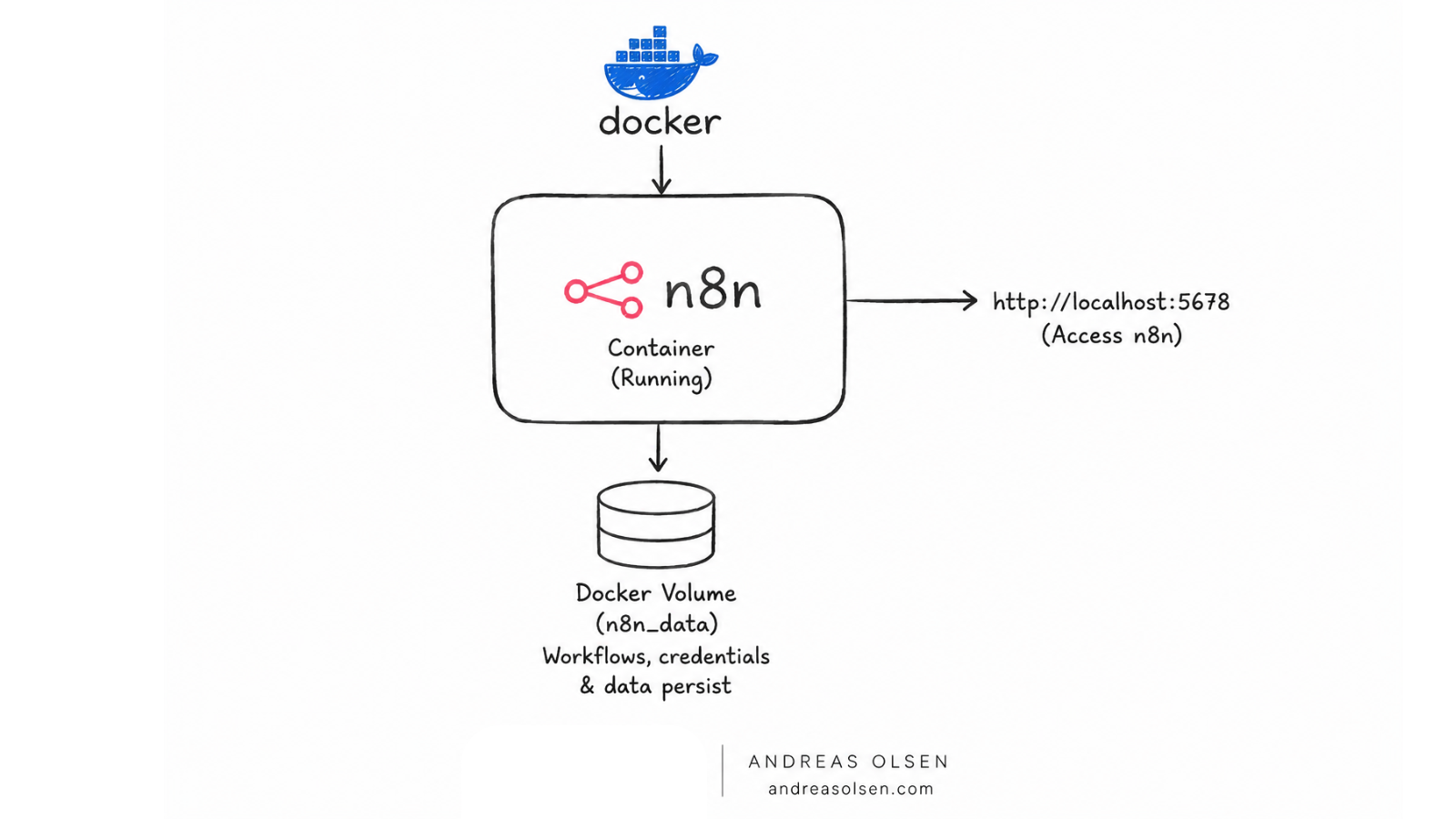
I also compared different installation methods, including a direct installation using Node.js and deployment with Docker. Docker was ultimately chosen because it creates an isolated and consistent environment that simplifies installation, upgrades, and long-term maintenance. It also makes the platform easier to move between systems if needed.
Planning
Before beginning the installation, I created a simple implementation plan to ensure the environment was built in a structured and reliable way. Rather than installing components as I discovered them, I wanted a clear sequence that would minimise configuration issues and provide a stable foundation for future automation projects.
The implementation plan included the following steps:
- Install Docker Desktop to provide the container environment.
- Create a dedicated Docker volume for persistent data storage.
- Deploy a self-hosted n8n instance using Docker.
- Configure environment variables, user authentication, and application settings.
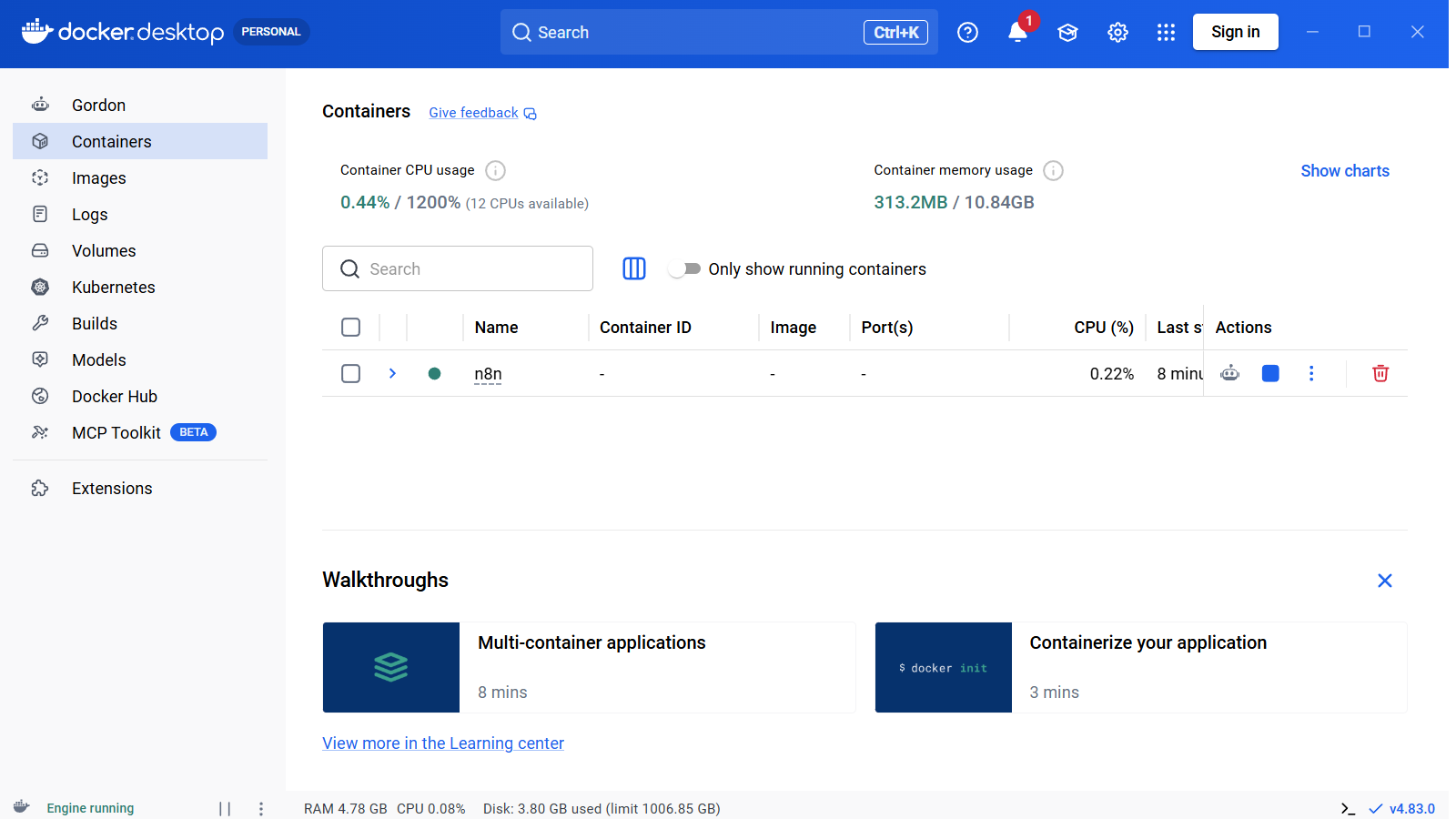
- Verify that the application starts successfully after restarting the container.
- Document the entire process for future reference and reproducibility.
Implementation
- Install Docker Desktop on a local Windows, macOS, or Linux machine. This project was completed on Windows.
- Install WSL using PowerShell by running the following command:
wsl --install- Restart your machine.
- Create a folder:
C:\n8n- Create a file compose.yaml and save it in the folder.
- Save this configuration in the
compose.yamlfile. Adjust the environment variables if required.
services:
  n8n:
    image: n8nio/n8n:latest
    container_name: n8n
    restart: unless-stopped
    ports:
      - "5678:5678"
    environment:
      - TZ=Europe/Copenhagen
    volumes:
      - n8n_data:/home/node/.n8n

volumes:
n8n_data:- In PowerShell choose:
cd C:\n8n- Run:
docker compose up -d
- Now it is possible to open n8n in http://localhost:5678
- Create your n8n user account. You are now ready to start building workflows.
- Verify that the Docker volume has been created by running the following command in PowerShell:
docker volume ls- The volume name should be: n8n_n8n_data
- Go to the folder containing your
compose.yamlfile and run the following commands to stop and restart the n8n container to verify that the application starts successfully after deployment.
docker start n8n
docker stop n8n
Tools Used
- n8n – Workflow automation platform.
- Docker Desktop – Container platform used to deploy and manage n8n.
- Docker Compose – Defined and managed the container configuration.
- Docker Volumes– Provided persistent storage for workflows, credentials, and application data.
- PowerShell – Executed Docker and WSL commands during installation and verification.
- Windows Subsystem for Linux (WSL 2) – Linux compatibility layer required by Docker Desktop on Windows.
Challenges
The installation itself was relatively straightforward, with the only issue being that Docker required a system restart before it functioned correctly.
The more significant challenge was understanding how Docker works behind the scenes. Concepts such as containers, images, volumes, and Docker Compose were new to me, and while I was able to deploy n8n successfully, I recognised that I still had more to learn about the underlying architecture.
I expect my understanding of Docker to improve as I continue working with the platform, particularly in future projects involving backups, updates, and more advanced deployments.
Solutions
By following the official Docker and n8n documentation, the installation issues were resolved with a simple system restart. Breaking the deployment into small, manageable steps also made it easier to understand each part of the process and verify that the installation was working as expected.
Results
The project resulted in a fully functional self-hosted n8n environment running in Docker. The platform was successfully deployed, a user account was created, and persistent storage was verified using a Docker volume. The environment is now ready for developing and testing workflow automation projects.
Key Learnings
- Successfully deployed my first self-hosted application using Docker.
- Gained an introductory understanding of Docker and its core concepts.
- Learned how Docker volumes are used to store application data outside the container.
- Identified areas for further learning, particularly around Docker architecture, backups, and container management.
Next Steps
- Build my first n8n workflow to understand the workflow editor and core automation concepts.
- Implement a backup strategy for Docker volumes to protect workflows and credentials.
- Explore more advanced Docker concepts, including container management and maintenance.
- Connect n8n to external services using APIs.
- Integrate AI services into automated workflows.
Resources
Why This Project Matters
This project represents my first major step towards learning workflow automation with n8n. Working with automation is something I have wanted to explore in depth for a long time, and building my own self-hosted environment marks the beginning of that journey.
More importantly, this project is not the end goal. It is the foundation for many future projects. I am excited to continue learning, developing more advanced workflows, and expanding my understanding of automation, Docker, APIs, and AI integrations as I progress.